B2B Online Portals: Design Tips and Best Practices
An effective and user-friendly web portal can dramatically increase B2B sales and customer satisfaction.
 20 Min Read
- Self‑service is now the B2B standard: 61% of buyers prefer a buying experience without a sales rep.
- Portals reduce friction: They replace back‑and‑forth emails with a single hub for orders, invoices, and support.
- Customer retention drives profit: A 5% increase in retention can boost profits by 25–95%.
- Portals support scalability: They handle higher volumes without adding operational strain, becoming a backbone for growth.
- Common portal types: Customer/Distributor, Partner/Channel, Internal Sales, Account Management, and Self‑Service Support.
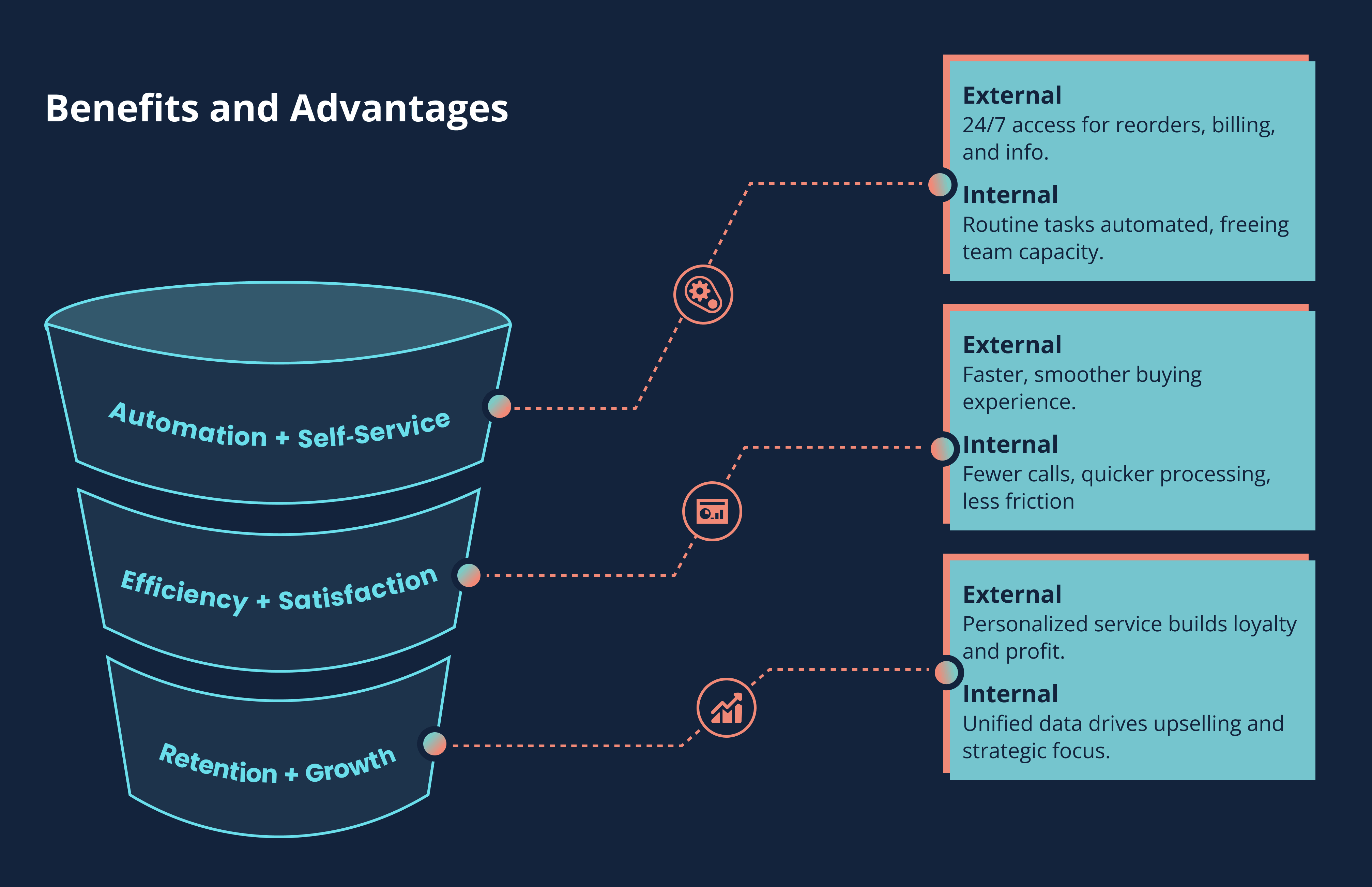
- External benefits: Faster buying cycles, personalized pricing, 24/7 access, and improved satisfaction.
- Internal benefits: Automation of routine tasks, fewer calls, quicker processing, and unified data visibility.
- Must‑have features: User roles, asset library, order/account management, self‑service support, analytics, integrations, mobile design, and usability.
-
Portal maturity stages:
- Basic
- Transactional
- Personalized
- Integrated
- Strategic
- Strategic impact: A well‑designed portal improves customer trust, strengthens internal efficiency, and creates a competitive advantage.
As B2B buyers increasingly complete most of their research and purchases online, self-service portals have become the new standard.
B2B buyers expect digital convenience. In fact, 61% actually prefer a buying experience that doesn't involve a sales representative. This makes a self-service B2B portal more than a “nice-to-have.” It is now the expectation.
It's easy to understand why. B2B portals connect buyers, partners, and internal teams in one place, making everyday tasks faster, clearer, and more convenient. They eliminate the friction of back-and-forth emails, eliminate guesswork, and provide every user with a consistent and reliable experience.
For many organizations, these online hubs also become the backbone of scalable growth, supporting higher order volumes and customer service requests without adding operational complexity or straining resources.
What Are B2B Online Portals? Some Types and Purposes
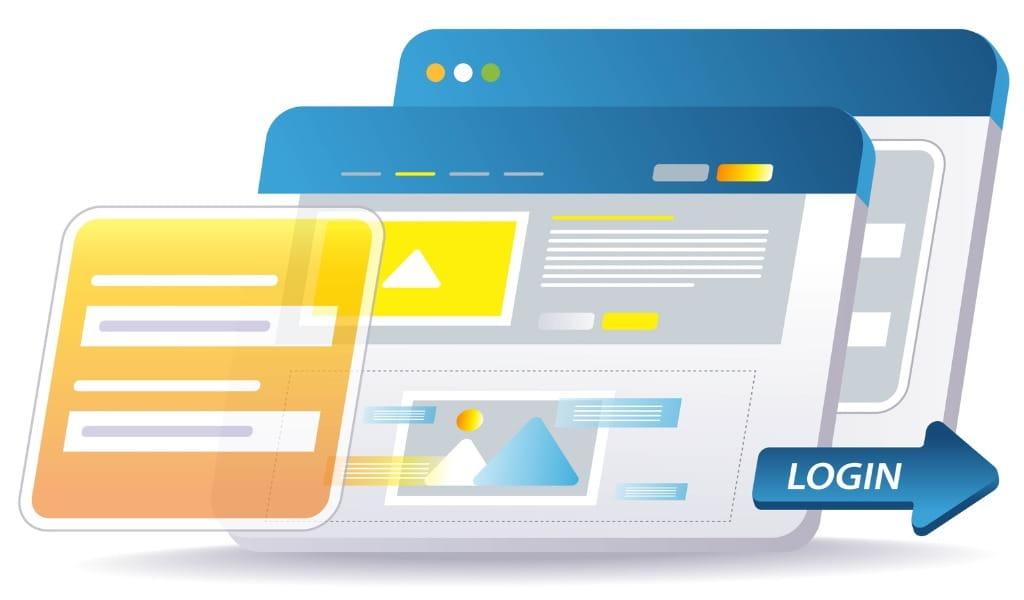 A B2B online portal is a secure website or application that directly connects your business operations with customers, distributors, partners, or sales staff.
In practice, a portal is a centralized platform where buyers can place and track orders, view personalized pricing and product catalogs, manage invoices and contracts, access documentation, and request support, all without contacting a sales representative by phone or email.
- Customer and Distributor Portals - External buyers or distributors log in to view product catalogs, pricing, and sales collateral. They can download marketing assets, place orders or requests, and track delivery.
- Partner and Channel Portals - Sales partners or agents access marketing kits, training materials, and co-marketing tools. This helps ensure partners use up-to-date content and supports brand consistency.
- Internal Sales Portals - Sales representatives or account managers have a dashboard that displays lead information, quotes, orders, and key customer data, which reduces manual steps and makes pipeline status easier to track.
- Account Management Portals - Customers manage their account details and view order history, invoices, payments, and credit terms. They can also reorder previous purchases or set up new contracts.
- Self-Service Support Portals - Customers and partners find help through FAQs, knowledge bases, support tickets, or chat. This reduces inbound inquiries and delivers answers at any time.
These portals solve many common problems. They reduce manual calls and emails by giving buyers self-service tools. Routine inquiries can be automated, so teams are not retyping data. Portals also expedite order processing with digital forms and approvals, enhancing accuracy. By consolidating resources in one place, organizations provide every user with a single source of truth.
With always-on access and personalized data, portals improve transparency and build trust. Tailoring the experience by role makes each user’s view relevant and actionable. For example, a distributor logging in may see quick links to download the latest co-branded brochure, while a customer sees a dashboard of pending orders.
Why Build a B2B Portal: Benefits and Advantages
A B2B portal can transform how a business operates behind the scenes and how customers interact with the company on a day-to-day basis. It replaces scattered processes with a centralized hub that makes tasks more organized, transparent, and easier for users at every stage.
Benefits for External Customers and Partners
- On-demand self-service: Portals provide customers and partners with 24/7 access to tools and information, enabling them to manage tasks such as reordering, billing, and downloading sales materials without needing to contact a sales representative.
- Improved experience: Buyers gain faster access to what they need, improving convenience and satisfaction.
- High buyer preference: Research shows that 86% of B2B buyers prefer self-service for routine tasks such as reordering and billing.
- Anytime, anywhere access: Portals enable users to access information from any device, removing delays caused by calls or emails.
- Personalized interactions: By displaying negotiated pricing, tailored catalogs, and product recommendations, portals create a relevant and efficient buying experience.
- Boosted retention and profitability: A 5% increase in customer retention can lead to a 25-95% increase in profits, highlighting the long-term value of personalization and convenience.
-
End-to-end support: Portals support buyers throughout the cycle.
- Awareness and consideration: Buyers can self-educate using product content.
- Purchase: Customers complete transactions without friction.
- Post-sale: Portals provide order tracking and support, building trust and repeat business.
- Overall impact: Faster buying cycles, improved satisfaction, and stronger customer relationships.
Benefits for Internal Sales and Operations
-
Automation of routine tasks
- Reduces manual order entry, invoicing, and status updates.
- Frees sales representatives to focus on customer engagement and relationship building.
-
Efficiency gains
- Manufacturers experience a significant drop in customer calls and reduced order processing time after implementing a portal.
- Teams can redirect saved time toward upselling and lead generation.
- Improved accuracy Automated workflows reduce human error and ensure consistent data entry.
-
Centralized data visibility
- Consolidates information from spreadsheets and emails into one system.
- Provides real-time insights into orders, payments, and customer behavior.
-
Cross-department alignment
- Sales, marketing, and operations share a unified record, reducing miscommunication about pricing and promotions.
- Automatic alerts, such as when a customer places a large order, support proactive follow-up.
-
Strategic advantages
- A well-designed portal enables customer transparency and internal efficiency, giving teams clearer data and more opportunities to increase sales.
Must-Have Features of a Successful B2B Portal
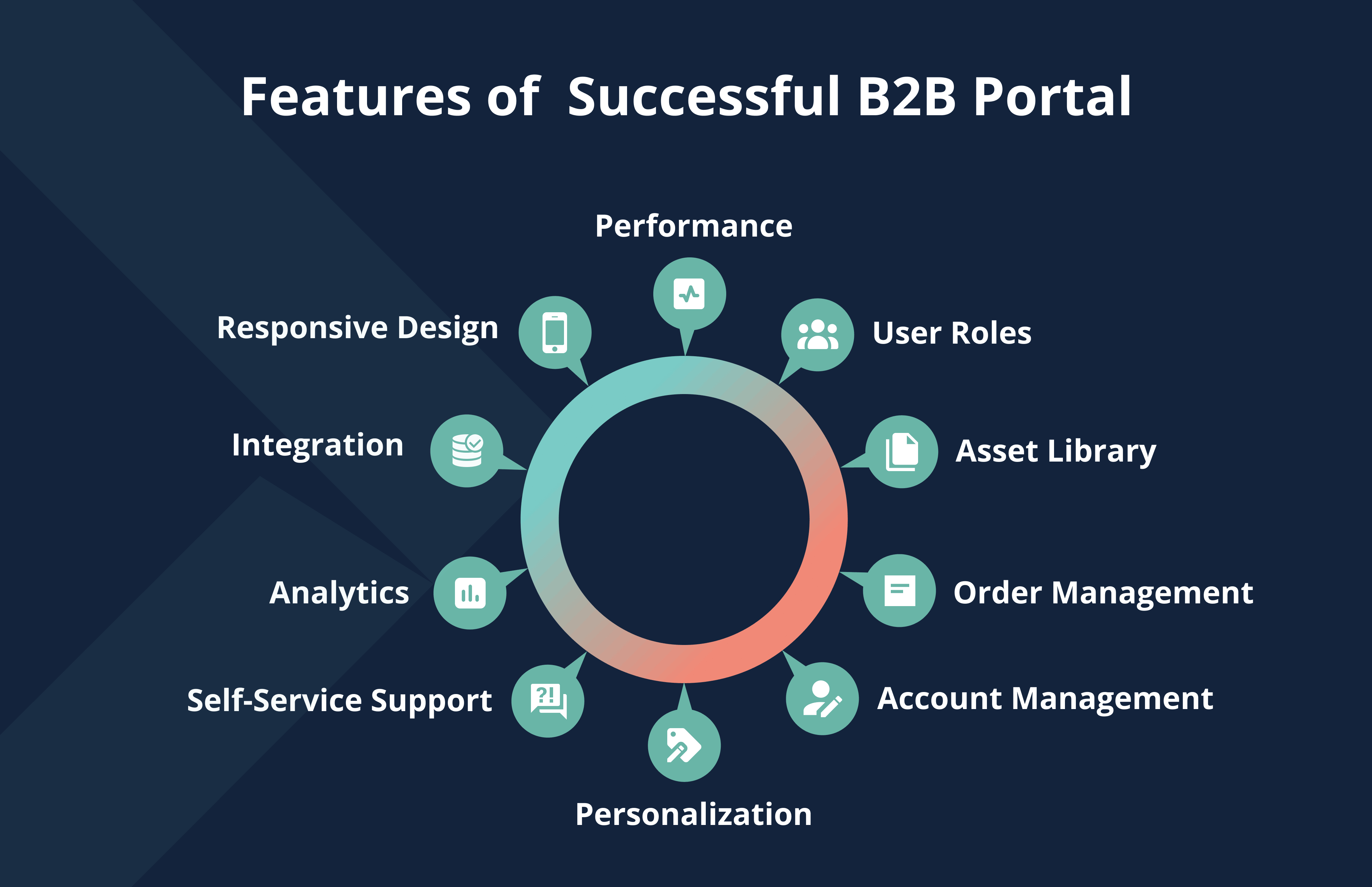
This section outlines the core features a modern B2B portal needs to support customers and internal teams effectively. If these features are not implemented, it's less likely that your internal (staff, distributors, partners) or external (customer) audiences will find the portal useful:
- User Roles and Permissions - Secure login for various user types (customers, partners, sales representatives, and administrators), with role-based access, ensuring each user views only their relevant content.
- Asset Library - A repository for marketing and sales materials that users can easily download or request printed copies.
- Order Management - An online catalog or order form that allows customers to place new orders, view pending orders, reorder past items, and track orders in real-time.
- Account Management - Customers can view and pay invoices, check credit limits and terms, and update billing and shipping information.
- Personalization - Each user’s dashboard or home page shows personalized data such as recent orders, recommended products, or curated announcements.
- Self-Service Report - Integrate FAQs, a searchable knowledge base, and online ticketing. Include live chat or a chatbot.
- Analytics and Reporting - Internal users need metrics on portal activity, logins, orders by customer, content downloads, and more to refine the portal and measure ROI.
- Integration with Core Systems - The portal should integrate with CRM, ERP, inventory, and pricing systems to enable real-time updates of data such as order status and stock levels, thereby preventing silos.
- Mobile and Responsive Design - Because many B2B buyers and representatives work on mobile devices, the portal must be fully responsive.
- Performance and Usability - Fast load times and an intuitive interface are essential. Follow best practices such as clear headings, bullet lists, and adequate white space. By including these features, customers and internal teams gain immediate value. A buyer logging in can see key information at a glance, while a sales manager can monitor activity and open support tickets.
Design and Development Best Practices
Designing a successful B2B portal requires more than technical functionality. It's about creating a smooth experience that meets user needs while aligning with business goals. A well-designed portal should be intuitive, secure, integrated, and continuously evolving. The following best practices help guide planning, design, and long-term optimization.
1. Put the User First
User-centered design involves building the portal around real user needs and ensuring that internal processes adapt to support those needs. Start by mapping user journeys. What tasks do customers or partners need to accomplish? Then tailor the user experience to support those tasks.
2. Keep the Interface Simple and Focused
Use clean navigation menus and search so users can quickly find what they need. On arrival, make it obvious who the portal is for. A welcome message or dashboard helps orient them. Write content in plain language, use headings and bullet lists, and avoid long, dense paragraphs. Short paragraphs get read. Long paragraphs get skimmed.
3. Prioritize Clarity in Design
Highlight critical actions like “Place Order” or “View Invoice” using prominent buttons. Use visual indicators such as icons or progress bars for status information. Each user should immediately recognize the tasks they can complete. Where possible, personalize the home screen. For example, a sales representative may see a summary of activity, while a customer sees order status and credit information.
4. Make Responsiveness and Accessibility a Priority
The portal should work across all devices and browsers. Follow WCAG accessibility guidelines so people with disabilities can use the portal without barriers. Ensure proper text contrast, provide alt text for images, and support keyboard navigation. Because many B2B buyers research on mobile devices, weak mobile performance can reduce adoption.
5. Design for Integration, Scalability, and Security
Choose a technology stack or CMS that connects reliably to your back-end systems. Utilize APIs or middleware to synchronize data in real-time. For security and performance, host the portal on a reliable infrastructure and use caching as needed. Since B2B portals handle sensitive information, it is essential to implement strong security measures, such as HTTPS, role-based permissions, and audit logs.
6. Adopt a Continuous Improvement Mindset
Launch with core features, and iterate as you gather insights. Track metrics like login frequency, task completion rates, and drop-off points to identify friction. Gather feedback from sales teams and customers.
Enhancements may include a mobile app, AI-driven recommendations, or expanded analytics. Ongoing optimization ensures the portal continues to meet business goals and user expectations.
Understand Portal Maturity Stages
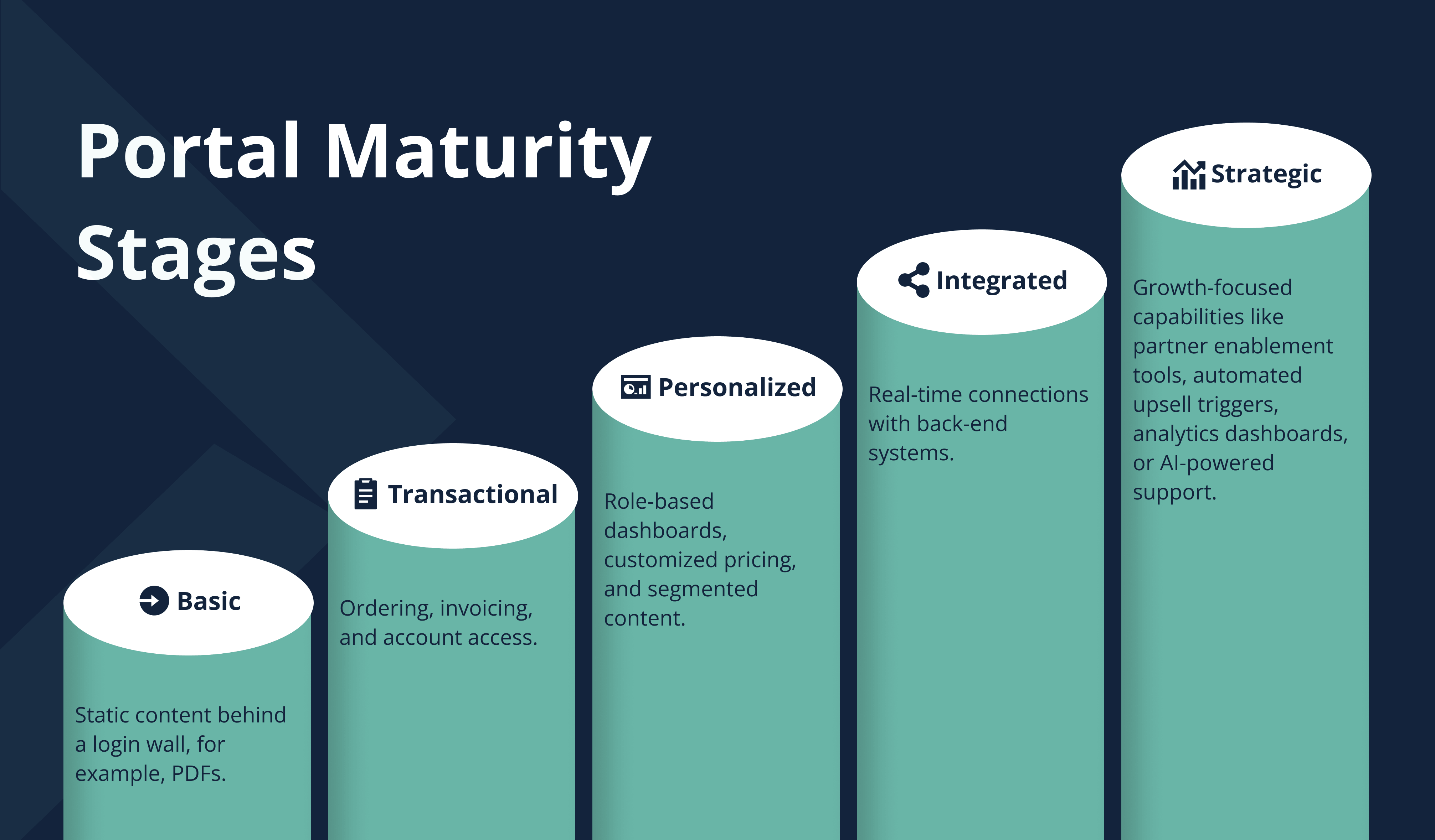
A portal typically moves through several maturity stages as it proves its value and internal momentum increases:
- Basic portal: Static content behind a login wall, for example, PDFs.
- Transactional portal: Ordering, invoicing, and account access.
- Personalized portal: Role-based dashboards, customized pricing, and segmented content.
- Integrated portal: Real-time connections with back-end systems.
- Strategic portal: Growth-focused capabilities like partner enablement tools, automated upsell triggers, analytics dashboards, or AI-powered support.
Phasing the portal often works best. Begin with transactional features, then expand into personalization and deeper integrations.
Launching and Ongoing Management
Even a well-designed portal can struggle if users don’t adopt it. Success depends on rollout and governance. Assign clear ownership after launch to oversee improvements. Establish a governance structure and roadmap that defines who sets priorities, approves updates, and measures results. Involve internal champions early, so the portal fits real workflows.
Communicate the portal’s value clearly. Provide training or quick-start guides to help users log in and explore. Consider piloting with a small group, collecting feedback, and refining before full rollout. Release new features in phases, for example, starting with order and account functions, then adding content libraries, live chat support, or mobile enhancements.
Continually track usage and key metrics to understand the portal’s impact. Tie these metrics to business goals to demonstrate ROI. A cross-department steering group should meet regularly to review performance data and plan the next phases of enhancements. Treating the portal as a long-term initiative ensures it stays aligned with customer expectations and remains a meaningful asset.
Custom-Built Versus Platform Approach: Pros and Cons
When building a B2B portal, businesses typically choose between custom development and platform-based or SaaS solutions, such as Salesforce Experience Cloud, Shopify Plus B2B, or BigCommerce B2B.
|
Approach |
Advantages |
Disadvantages |
| Custom-built portal |
- Tailored to specific business processes. - Full control over design, features, and integrations. - Supports unique capabilities and differentiation. - Deep integration with existing systems and workflows. |
- Longer development timeline. - Higher upfront and ongoing costs. - Requires a strong internal or agency development team. - Responsibility for maintenance, scaling, and updates. - Risk of scope creep if requirements are not tightly managed. |
| Platform, SaaS, off-the-shelf portal |
- Faster deployment with minimal coding. - Lower initial cost compared to custom builds. - Built-in best practices and ready-to-use features. - Vendor handles updates, hosting, and security. - Access to a large ecosystem of extensions and integrations. |
- Less flexibility for deep customization. - May require adapting business processes to fit the platform. - Recurring licensing or subscription costs. - Potential for vendor lock-in or limited custom integrations. |
Some organizations adopt a hybrid approach, starting with a platform for speed and layering custom modules or microservices as needs grow. The best choice depends on budget, timeline, and whether your portal requirements are highly specialized. A build-vs-buy assessment helps compare the total cost of ownership, time to value, and alignment with the long-term roadmap.
The Journey to a Stronger, More Scalable B2B Future

A well-designed B2B portal is a strategic investment for both sides of the business. For external customers and partners, it means faster self-service, personalization, and round-the-clock support, which builds loyalty and simplifies purchasing.
For internal teams, it automates routine tasks, improves data visibility, and frees sales and operations to focus on higher-value work. In practice, a portal removes friction.
To get it right, focus on the user experience from day one. Select the features that offer clear value to customers and internal teams, and integrate the portal with your back-end systems to ensure data remains in sync.
Design with clarity and simplicity. Use short paragraphs, headings, and bullet points so users can scan and take action quickly. Make the portal mobile-friendly and secure. Plan a phased rollout with clear ownership and ongoing improvement.
If your organization does not have a portal or is using an outdated one, now is the time to take action. Map user journeys, define roles, and create a portal strategy roadmap. Whether you build a custom solution or use a platform, the goal is to create a portal that supports both customer needs and internal efficiency. When executed well, a B2B portal improves the customer experience, strengthens internal processes, and becomes a competitive advantage.
Contact Us to Design Your Customer Portal
FAQs
A B2B portal is an interactive, secure platform where logged-in users manage accounts, orders, assets, and support. A regular B2B website is public-facing and lacks personalized login features.
Any B2B company with repeat sales or a partner network can benefit. Even small businesses with frequent orders or distributors often see efficiency gains. Very simple businesses may not need a portal, but most growth-focused organizations do.
Costs vary. A basic portal built on a platform may cost tens of thousands, while a fully custom solution can reach six figures. ROI comes from reduced labor, faster order cycles, and higher sales driven by better self-service.
Timelines depend on complexity. A basic platform-based portal may take 2-3 months. A custom build with multiple integrations can take 612 months or more.
Yes. Integration is essential for real-time data. Modern portals use APIs or middleware to connect with legacy systems so order data, inventory, pricing, and customer records stay synchronized.
Common issues include limited user involvement during design, releasing too many features at once, weak mobile usability, and overlooking change management.
Track both usage and business metrics. Key indicators include active users, login frequency, order volume and value, reductions in support calls or order errors, and staff time saved. Surveys or NPS scores can gauge user satisfaction. Review sales impact as well, such as average order size and repeat purchase rates. Analytics can show where users spend time in the portal and where friction still exists.
Related Posts